
Microsoft Clarity Copilot: Find Website Enquiry Friction Before Buying More Traffic
Use Microsoft Clarity Copilot to triage website enquiry friction with AI, human replay review, one controlled fix and qualified-enquiry measurement.
UniqueTechCamp Editorial
Lead Systems Architect • UniqueTechCamp Engineering Unit
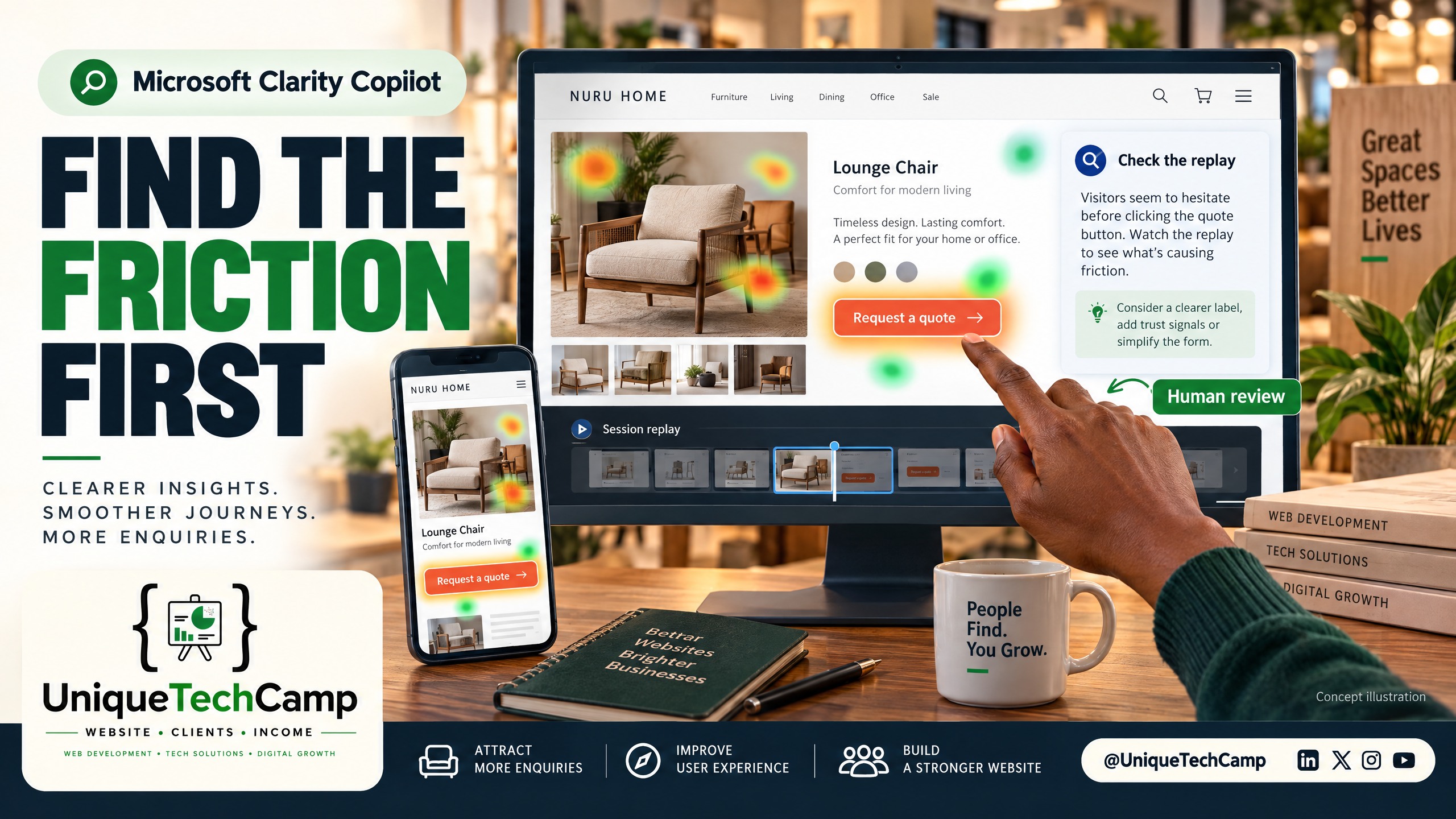
Visual note: This is an AI-generated concept illustration, not an authentic Clarity screenshot and not real customer data.
A Nairobi furniture showroom can buy more clicks and still miss the sale. A visitor may reach the sofa collection, fail to understand whether the item is available, hesitate over delivery information, tap a non-interactive image, or abandon a quote form on a phone. More traffic does not repair that uncertainty. Before increasing acquisition activity, the owner needs a practical way to locate the enquiry friction already inside the website journey.
Microsoft Clarity Copilot is useful here as an AI-assisted triage layer, not as an oracle. It can summarise behaviour in session recordings and heatmaps, helping a small team decide which replays deserve human attention. The disciplined sequence is: AI summary, human replay review, one controlled website fix, then qualified-enquiry measurement. That is a business-growth guide, not a launch announcement, a promise of revenue or a substitute for commercial judgement.
Microsoft documented Copilot features in its 2 May 2024 official quick guide to Copilot . Treat that dated guide as historical evidence that the feature was established by then; check the live product and account before assuming a control is available to you today.
The problem: buying traffic can amplify enquiry friction
Picture a hypothetical Nairobi showroom selling made-to-order dining tables, sofas and bedroom furniture. Its landing page receives visits from search and social campaigns. The owner sees sessions and a few messages, so the next idea is to buy more traffic. Yet a visitor may be unable to tell which products are displayed in the showroom, whether measurements can be customised, where delivery applies, or what happens after submitting an enquiry.
This is a conversion problem before it is an advertising problem. A high exit rate does not explain itself. A rage click or dead click is a useful signal to investigate, but neither proves that a particular element caused abandonment. A visitor can click repeatedly because a control is broken, because the content is ambiguous, or because the person is simply exploring. Human review must connect the signal to the page and the journey.
Clarity also does not know whether an enquiry is commercially useful unless the business records that outcome outside the behaviour tool. A submitted form may have a missing phone number, an out-of-area request or no plausible purchase timeframe. The measurement target should therefore move from sessions to qualified enquiries: a contact that fits the showroom’s service area and offer, has a reachable contact route and can be followed up by the team.
What Clarity and Copilot can do now
The current Clarity Copilot product page describes conversational questions about project dashboard data, individual session insights, grouped recording summaries and heatmap summaries. The page says grouped summarisation can cover up to 250 recordings at once. That is a documented product capability, not a guarantee that every project, device or account view will expose identical controls.
A heatmap is aggregated evidence. Microsoft’s heatmaps overview documents click, scroll, area, conversion and attention maps across supported page views and devices. For the showroom, a scroll map might show that delivery information sits below the point most visitors reach; a click map might show attention around a gallery or a weak call to action. Copilot can summarise the pattern, but the owner still needs to inspect the page and decide what change is safe.
A recording is different: it is an individual journey that can reveal sequence and context. The session insights documentation says Copilot generates plain-language takeaways from recordings and requires the Clarity tracking code. It also cautions that generative AI can misinterpret or generate incorrect information. Session insights are unavailable for sessions shorter than five seconds and are not supported for mobile apps in that documentation. Do not treat a missing summary as proof that nothing happened.
The Clarity pricing page currently presents the service as free forever, with no traffic limits or forced paid upgrade, and lists recordings, heatmaps, rage/dead-click insights, filters and Copilot among its features. Free software still has labour, implementation and privacy-review costs. Someone must define the question, inspect replays, fix the page, validate the form and follow up enquiries.
An eight-step controlled workflow
- Define the enquiry that matters. Write a short acceptance rule before opening Copilot. For the showroom, a qualified enquiry might state a product or category, a Nairobi-area delivery or showroom intent, a reachable contact and a realistic buying timeframe. Keep raw visits, form submissions, phone calls and qualified enquiries as separate measures. Do not call a contact qualified merely because a button was clicked.
- Choose one journey and one question. Start with one landing page and one friction question, such as: “Where do mobile visitors who view a sofa collection stop before sending an enquiry?” Record the page version, traffic source if known, device segment and observation window. Do not combine a new offer, new campaign, new form and new page redesign in the same test.
- Check setup, masking and consent before analysis. Confirm the tracking code is installed on the intended site and that the team knows which project is being reviewed. Review masking rules for names, phone numbers, email addresses, addresses, form fields and any confidential business data. Microsoft’s Clarity FAQ says site owners control content sent to Clarity and should block confidential content; it also notes that Clarity does not respond to browser Do-Not-Track signals. Ask the owner’s technical and privacy reviewers to check the implementation. Do not directly enable tracking or assume a universal consent rule from this article.
- Ask Copilot for a bounded triage summary. Apply the available page and device filters first. In chat, ask only about dashboard data it can access: “For this filtered page and device segment, describe the dashboard patterns you can support. Separate observed metrics from inference. State which requested details are unavailable. Do not infer why visitors left or which enquiries are qualified.” Use the separate session or heatmap summary features for their respective evidence. If chat cannot retrieve replay segments, open the recordings manually; do not assume a transcript or timestamp tool is available. A good prompt narrows the question rather than inventing access to data.
- Human-check the selected replays. Open recordings associated with the selected cohort and inspect the sequence around the suspected friction. Check viewport, page state, loading, image behaviour, form errors, navigation labels, contact details and whether the visitor actually reached the intended enquiry route. Record two or three representative examples and at least one counterexample. Accept the AI suggestion only when the replay visibly supports it; otherwise label it unconfirmed and do not change the page.
- Select one controlled website fix. Choose the smallest change that directly addresses the accepted pattern: for example, make the enquiry action clearer near the relevant product context, clarify showroom and delivery wording, or remove an ambiguous interaction. Do not add a claim about stock, delivery timing or price unless the business can substantiate it. Keep the rest of the journey stable and document the old and new wording, page location, date and owner approval.
- Measure qualified enquiries, not just behaviour signals. Compare the defined journey with a suitable baseline or an agreed before-and-after period, while recording traffic source, device, page version, form starts, completed forms, calls, response time and qualification outcomes. The business should mark whether each contact fits the offer and can be followed up. Clarity can show behaviour; it cannot independently confirm a sale, a genuine budget or a useful buying timeframe. Do not claim causation from a busier week.
- Decide, document and stop safely. After the review window, keep, revise or roll back the single fix. Preserve the prompt, AI summary, replay examples, masking/consent review, page version and qualification notes. If evidence is mixed, stop and gather better evidence rather than buying more traffic or stacking another change. A repeatable decision record is more valuable than an impressive dashboard screenshot.
A small team can also ask UniqueTechCamp’s AI Solutions Desk to map the hand-off between behaviour evidence, website changes and enquiry qualification. The useful role is to make the process traceable, not to automate a privacy decision or pretend an AI summary is a customer interview.
Measurement that survives a busy dashboard
Build a simple evidence sheet around the chosen page and period. Track visits to the page, relevant scroll depth, clicks on the enquiry action, form starts, completed forms, calls where the source can be recorded, response time and qualified-enquiry status. Add device and traffic-source segments only when they are available consistently. Keep a note of page changes, campaign changes, stock changes, opening-hour changes and unusual promotions that could affect demand.
Use Copilot to prioritise review, not to create a synthetic conversion rate. Heatmap intensity is aggregated interaction; it does not identify an individual’s intent. A recording shows a journey but not the person’s unspoken reason for leaving. A dead click can be a design defect or an exploratory tap. A rage click can reflect impatience, a repeated attempt or a misunderstood label. These are motivations for review, not proof of motivation.
The qualification step belongs with the business. The showroom might tag an enquiry as qualified, unqualified, awaiting clarification or unreachable, with a short reason. That reason should not be copied into an analytics field unless the privacy and technical reviewers have approved the data design. Compare the rate and quality of enquiries only after the owner has agreed what the labels mean.
Limits, privacy and availability
Clarity’s data retention documentation says playback data is retained for 30 days, while click data and labelled or favourited sessions are retained for 9 months. That makes replay review time-sensitive: if a suspected issue matters, record the evidence your team is permitted to retain in an approved process rather than assuming an old recording will remain available.
Consent and masking need a project-specific review. Microsoft’s consent management documentation describes consent signals, Consent Mode and feature impact when consent is not provided, including markets where Microsoft enforces consent-signal requirements. Those are product and documentation details, not Kenyan legal advice and not a universal rule for every visitor. Have a qualified privacy adviser and the site’s technical owner review the audience, jurisdictions, banner, signal handling and data flows where appropriate.
Masking is not a one-time checkbox. Test what appears in a replay on desktop and mobile, including form fields, error states, embedded tools and dynamically loaded content. If the team cannot explain why a field is collected, where it goes and who can access it, pause the analysis and seek qualified review. Clarity is free to access, but privacy review, engineering time, customer follow-up and controlled experimentation are not free labour.
Copilot availability can also vary by product surface and project state. The tracking code must be installed for the documented session-insight workflow; short sessions may not receive insights; and AI output can be wrong. Verify the live interface and documentation, then treat a missing feature as an availability question rather than inventing a workaround.
Frequently asked questions
Is Microsoft Clarity Copilot a replacement for watching recordings?
No. It helps prioritise and summarise, which can reduce the first pass through a large set of recordings. The human reviewer still needs to open the underlying replay, check page context and reject unsupported conclusions before a website change is approved.
Do rage clicks prove that my enquiry form is broken?
No. They are diagnostic signals, not proof of cause or user intent. Check the sequence, device, page state, error feedback and the intended action in representative recordings. Then look for corroboration in form starts, completions and qualified-enquiry notes.
Can a free Clarity plan measure qualified leads for me?
Clarity can help observe website behaviour, and its pricing page describes the service as free. It does not replace a CRM, a call-handling process or a human qualification rule. The owner must define and record what “qualified” means, while technical and privacy reviewers check the data design.
Should a Nairobi SME enable tracking immediately after reading this?
Not on the strength of this guide alone. First have the authorised technical owner review installation, masking, consent handling, data access and the intended question. Where the business or its audience creates uncertainty, obtain qualified privacy advice. Start analysis only after the owner approves the setup and measurement plan.
Conclusion
Microsoft Clarity Copilot is most useful when it helps a small business ask a narrower question of its existing website evidence. For a Nairobi furniture showroom, the responsible growth move is not “buy more traffic because the dashboard is quiet”. It is to triage one enquiry journey, inspect the supporting replays, apply one controlled fix and measure whether qualified enquiries improve without confusing activity for demand. That operating loop turns AI assistance into a practical decision process while keeping human judgement, privacy review and commercial follow-up in the centre.
Need this built for your business?
For business owners, start with one page, one measurable enquiry goal and an owner-approved evidence plan. Bring the current journey and any permitted examples—not a database of customer details.
- Ask UniqueTechCamp’s AI Solutions Desk to design a human-reviewed behaviour-to-enquiry workflow.
- Book an appointment to discuss the website question, evidence plan and controlled fix.
- Review Website Performance Reports when the friction may also involve technical performance or mobile usability; that service is complementary and does not automatically include Clarity implementation.
Deploy An Autonomous AI Lead Gen System Today
We engineer high-converting web applications with integrated 24/7 WhatsApp qualification bots and multi-channel follow-up drips.
Related Strategy Articles

Gemini Small-Business Tools: A Safe Growth Pilot for Kenyan SMEs
Google's Gemini business page brings brand, finance and app tools together. A cautious pilot for Kenyan SMEs, with privacy and review checks.
Google Docs Captions and Cross-References for Kenyan SMEs
Use Google Docs captions, cross-references and caption tables to keep Kenyan SME reports and tender documents easier to navigate after edits.

ChatGPT for Sales: A Human-Reviewed CRM Pilot for Kenyan SMEs
OpenAI's new ChatGPT for Sales adds sales workflows. Learn how Kenyan SMEs can pilot CRM connections with human review, privacy checks and clear measures.
UniqueTechCamp Desk
Online • Reply < 5 mins